How to Recreate a Restaurant Dish at Home From a Photo
Took a photo of a dish you loved at a restaurant? What to note at the table, why restaurant food tastes different, and how to turn the photo into a home recipe.
By Usama Kashif, founder and lead engineer. Read the full CookThis project context for the product decisions behind this work.
To recreate a restaurant dish from a photo, take a clear picture and note the menu name and how it tasted while you are still at the table. Then generate an estimated home recipe and adjust it after the first attempt. You won’t get the kitchen’s exact recipe, but you can get a version you’d happily cook again.
At the Table: What to Capture
The photo is only half the input. Spend 30 seconds on the rest while you still remember it:
- The plate. Use good light, shoot from slightly above, and keep sides and garnish in frame.
- The menu text. Photograph the description. “Chicken in a peppery cream sauce with spinach” is gold.
- The taste. Smoky, sour, sweet, buttery, or spicy, and how spicy.
- Texture. Crisp, saucy, tender, chewy, or charred.
- Anything you spotted. Sesame, coriander, a particular cheese, lemon, or chili flakes.
- Allergens. If they matter to you, ask the staff what is in the dish.
Why Restaurant Food Tastes Different
Most of the gap between restaurant and home cooking comes from a few habits, not secret ingredients:
| Restaurant habit | What to do at home |
|---|---|
| More salt, seasoned at every stage | Season in layers and taste before serving |
| More fat (butter, oil, cream) | Finish sauces with a small knob of butter |
| Very high heat | Preheat the pan fully and cook in smaller batches |
| Sauces and stocks made in advance | Use good stock, and reduce sauces a little longer |
| A finishing touch of acid or herbs | Add lemon, vinegar, or fresh herbs at the end |
Keep these in mind when you taste your first attempt. They are usually the fix.
Turning the Photo Into a Recipe
- Upload the photo to a photo-to-recipe app or an image-capable chatbot.
- Add your notes. Menu name, cuisine, flavors, servings, and the equipment you actually have.
- Choose the goal. In CookThis, Closest Taste aims for resemblance, Easy simplifies a technical dish, Quick makes a weeknight version, and Healthier lightens it.
- Review before cooking. Check quantities, allergens, and safe cooking temperatures.
- Cook, taste, adjust. Treat the first attempt as a draft.
Example: Biryani From a Biryani Shop
Here is a real result. I photographed chicken biryani being served from a large degh at a biryani shop, then chose Closest Taste mode for one portion. CookThis identified it as Chicken Biryani, labelled it “best guess”, and scaled a shop-sized dish down to a single-pot home recipe.
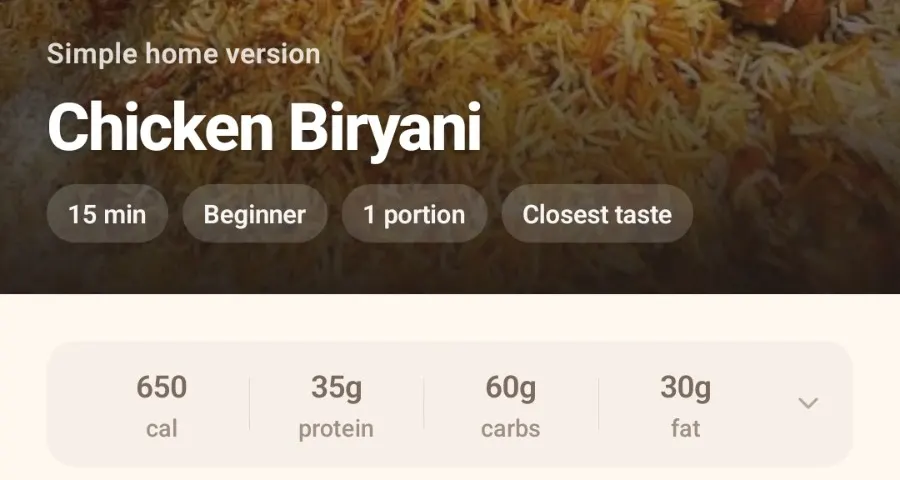
Closest Taste mode, scaled to one portion.
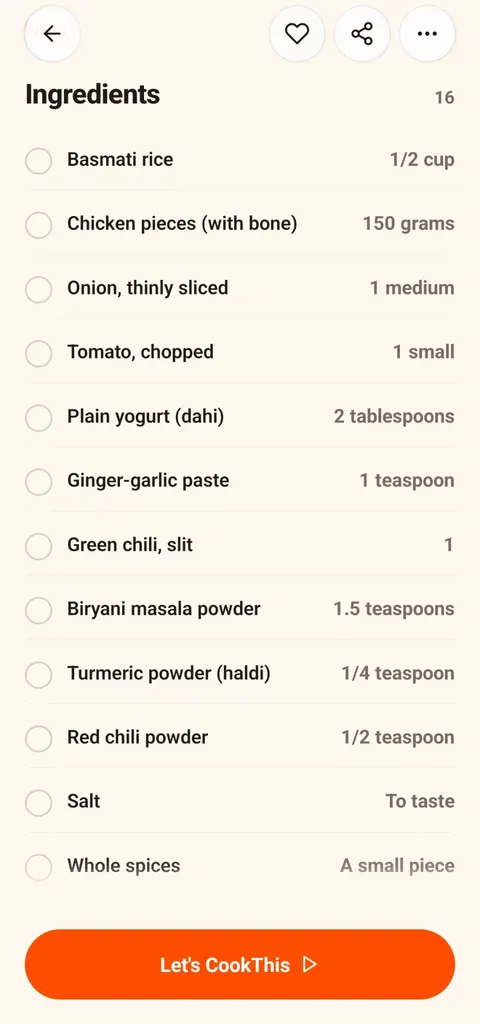
Shop-style flavors from supermarket ingredients.
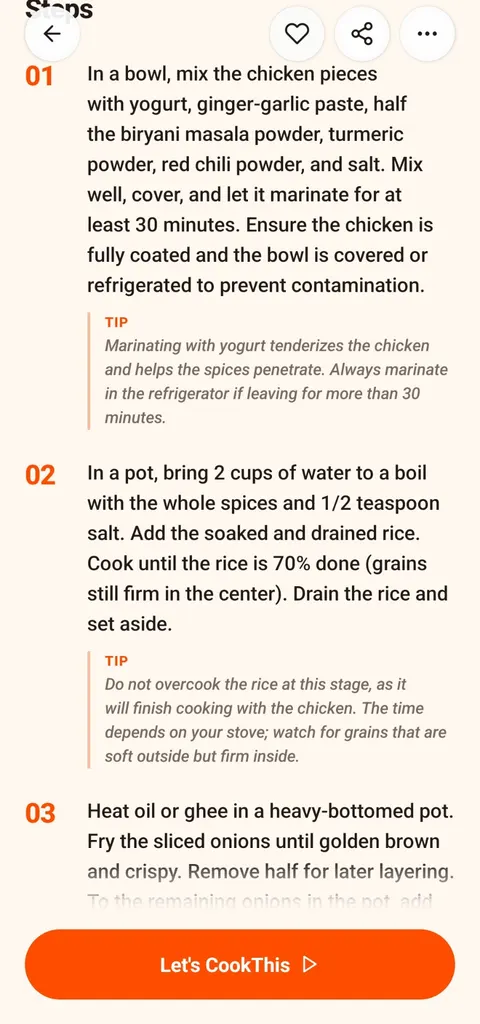
The technique is kept: parboiled rice, fried onions, layering.
The method keeps what makes shop biryani taste the way it does: rice parboiled to about 70% with whole spices, onions fried until crisp with half kept back for layering, and a yogurt-based marinade. It doesn’t copy the shop’s exact masala, and nothing can from a photo. A second biryani result, with the full step-by-step cooking run, is in the Pakistani recipe guide.
If your version tastes flat compared with the shop’s, the table above usually explains why. Try a little more salt, more ghee, or fried onions stirred through at the end.
What a Photo Can’t Tell You
A picture shows color, texture, and visible ingredients. It cannot show a marinade, a house spice mix, a commercial sauce base, exact quantities, or allergens. That is why every generated recipe is an estimate, and why your tasting notes matter more than the photo.
If you don’t know what the dish is called, start with what is this dish? For other ways to go from picture to recipe, see how to get a recipe from a food photo.
CookThis is free to download on Android, with 3 free credits to try it and a weekly or monthly subscription after that.
Get CookThis on Google Play or view the full project page.
frequently asked questions
How do you turn a restaurant food photo into a recipe?
Will I get the restaurant's exact recipe?
Why does restaurant food taste better than my version?
What should I write down at the restaurant?
Can I ask the restaurant for the recipe?
related CookThis guides
AI Recipe Generator for Pakistani and Desi Home Cooking
See a real CookThis chicken biryani recipe generated from one photo, plus how local ingredient names, halal settings, and Pakistani substitutions work.
What Is This Dish? How to Identify Food From a Photo
Can't name a dish you photographed? Here is how to identify food from a photo, what a picture can and cannot reveal, and how to turn it into a recipe.
How to Choose the Best Recipe App for Android
There is no single best recipe app for Android. Match the app type to how you cook: recipe library, recipe manager, pantry finder, or photo to recipe.
CookThis: See it. Snap it. Cook your version.
CookThis turns restaurant photos, screenshots, and ingredients into practical home recipes on Android. Free to download with 3 free credits to try it.

