What Is This Dish? How to Identify Food From a Photo
Can't name a dish you photographed? Here is how to identify food from a photo, what a picture can and cannot reveal, and how to turn it into a recipe.
By Usama Kashif, founder and lead engineer. Read the full CookThis project context for the product decisions behind this work.
To identify a dish from a photo, use the clearest image you have and add what the photo cannot show: the cuisine, where you ate it, and how it tasted. A visual lookup tool can suggest a name. A photo-to-recipe app like CookThis suggests a name and also gives you a recipe to cook.
Most people asking “what is this dish?” are stuck in the same loop: you can’t search for a recipe without the name, and you can’t get the name without searching.
Two Ways to Answer “What Is This Dish?”
| If you want… | Use | What you get |
|---|---|---|
| Just the name | Visual lookup (Google Lens, Apple Visual Look Up) | A likely name and links to similar images |
| The name and a recipe | A photo-to-recipe app such as CookThis | A best-guess dish name plus ingredients and steps |
If you only want to know what you ate, visual lookup is enough. If the real goal is to make it at home, skip a step and start from the photo.
What a Food Photo Can Tell You
A photo carries useful clues:
- Protein — chicken, beef, fish, paneer, tofu, or eggs
- Sauce — thin or thick, creamy or oily, red, green or brown
- Starch — rice, noodles, bread, or potatoes
- Cooking marks — charring, browning, breading, or steaming
- Garnish and plating — sesame seeds, herbs, chilies, or a specific presentation
It cannot show the marinade, the spice blend, the fat in the sauce, or anything buried inside. Two dishes can look almost identical and taste completely different.
A Real Example
Here CookThis identified a plate as Beef Bulgogi and labelled the result “Best guess” rather than presenting it as certain. The recipe below the label was built from that identification.
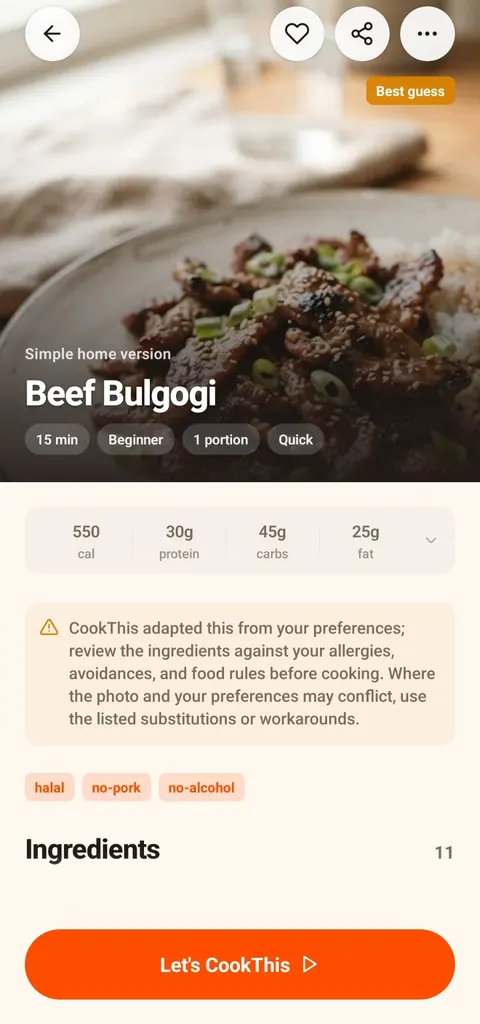
The dish name comes with a "best guess" label, not false certainty.
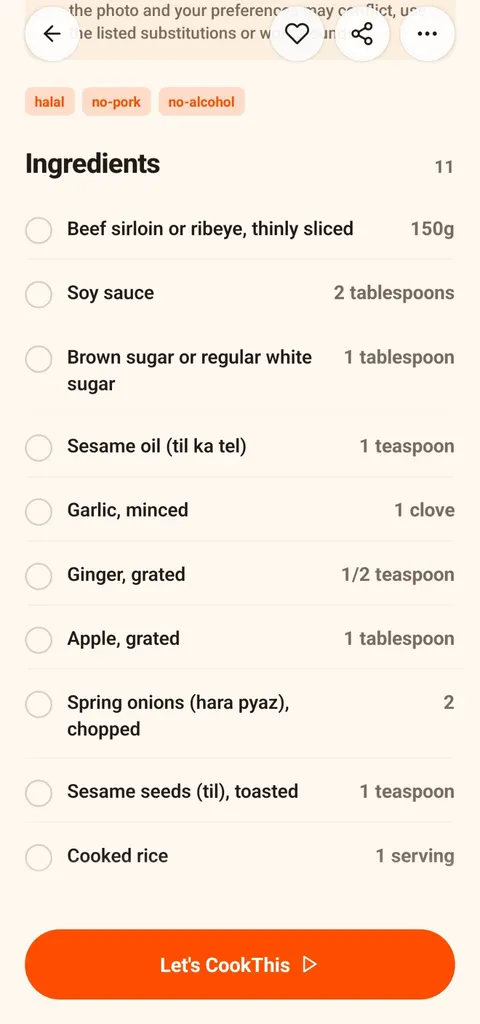
Once identified, the dish becomes an ingredient list you can shop for.
The full bulgogi walkthrough shows the steps and cooking mode for the same result.
How to Get a Better Identification
- Use the sharpest, best-lit image. Avoid heavy filters, stickers, or text covering the food.
- Keep the main dish in frame. Include sides or toppings if they are part of the dish.
- Add the cuisine or location. A brown curry from a Thai restaurant and one from a Pakistani restaurant point to very different dishes.
- Describe the taste. Smoky, sour, sweet, creamy, or spicy narrows the options quickly.
- Name anything you noticed. Coconut, peanuts, yogurt, sesame, or a particular cheese can settle the question.
- Treat the answer as a best guess. If it does not match what you ate, add more context and try again.
What If I Only Have a Screenshot?
A screenshot works the same way as a photo. That covers a delivery-app listing, an Instagram post, a TikTok frame, or a picture someone sent in a group chat. If it came from a video, see how to get a recipe from a TikTok food video. If you photographed it at a restaurant, see how to recreate a restaurant dish from a photo.
Identification Is Not an Ingredient Check
Knowing what a dish probably is does not tell you everything inside it. Sauces can hide nuts, dairy, alcohol, or gelatin. Do not rely on a visual identification for allergy, medical, or dietary decisions. Check the actual ingredients and labels.
From Name to Recipe
CookThis is free to download on Android, with 3 free credits to try it and a weekly or monthly subscription after that. Take or upload the photo, add what you remember, and you get a likely dish name with a practical home recipe. If you prefer a different route, the guide on how to get a recipe from a food photo compares all four methods.
Get CookThis on Google Play or view the full project page.
frequently asked questions
How do I find out what a dish is called from a photo?
Can AI identify a dish from a photo?
Can I identify a dish from a screenshot?
Can a photo reveal the exact recipe?
Is identifying a dish enough to know if it is safe for my allergies?
related CookThis guides
How to Recreate a Restaurant Dish at Home From a Photo
Took a photo of a dish you loved at a restaurant? What to note at the table, why restaurant food tastes different, and how to turn the photo into a home recipe.
How to Choose the Best Recipe App for Android
There is no single best recipe app for Android. Match the app type to how you cook: recipe library, recipe manager, pantry finder, or photo to recipe.
How I Built CookThis: An AI Recipe Generator From a Food Photo
A founder's account of building CookThis: how the photo-to-recipe pipeline works, why results are labelled as estimates, and the stack behind the Android app.
CookThis: See it. Snap it. Cook your version.
CookThis turns restaurant photos, screenshots, and ingredients into practical home recipes on Android. Free to download with 3 free credits to try it.

