What Is CookThis?
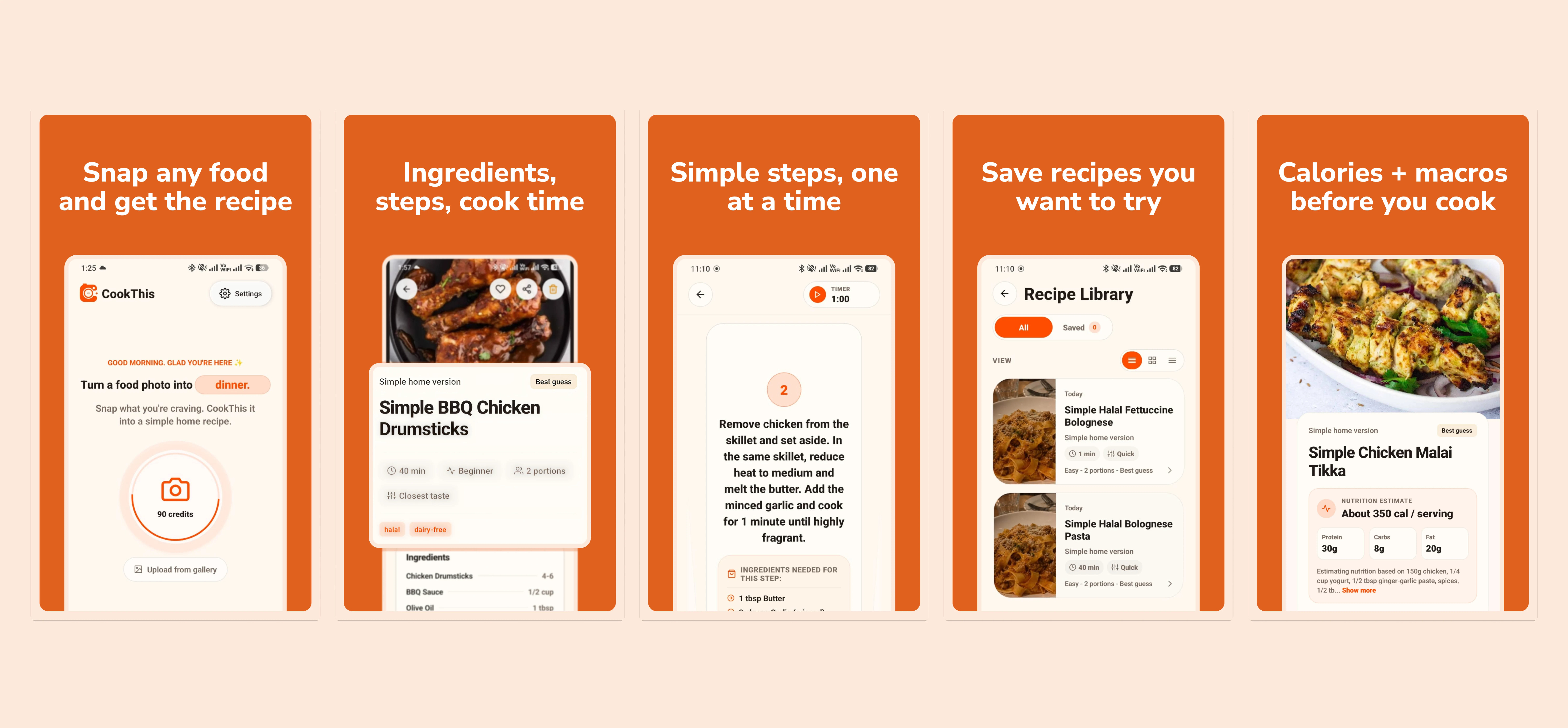
CookThis is an Android AI recipe generator from a food photo. Take a picture of a finished dish, choose a screenshot, enter ingredients, or share a supported food link, then generate an estimated home recipe adapted to your cooking skill, servings, kitchen equipment, region, and dietary preferences.
It begins with a familiar moment: you see food at a restaurant, on a social feed, or at a friend’s table and think, “I want to make that.” CookThis closes the gap between that visual inspiration and practical instructions you can use in a real home kitchen.
How Does CookThis Turn a Food Photo Into a Recipe?
- Take or choose a food photo. Use the Android camera, a saved image, or a food screenshot.
- Add useful context. Include a dish name, remembered flavor, location, equipment, dietary preference, or serving count when it helps.
- Choose a recipe mode. Quick, Easy, Closest Taste, and Healthier modes shape the result around a different cooking goal.
- Review the estimate. Check ingredients, allergens, substitutions, cooking temperatures, and anything the image could not reveal.
- Cook step by step. Save the recipe and open it in a focused cooking view.
My Role
I independently shaped the product, designed the camera-first experience and engineered the mobile application from concept through its Google Play release. My work covered product decisions, UX, React Native development, backend integration, AI implementation, subscriptions and product analytics.
Choose the Starting Point You Already Have
CookThis supports several distinct cooking moments. You can build a recipe from ingredients already in the kitchen, turn a saved TikTok or food screenshot into a recipe, or recreate a restaurant dish from a photo.
The result can also follow the goal of the cook. Easy mode provides a beginner-friendly path, Healthier mode creates a lighter interpretation of the photographed dish, and dietary preferences can guide generation with clear limits such as the halal-aware workflow.
If the plate in front of you is already familiar, you can turn a restaurant food photo into a recipe and get a home version to cook. When the name is the missing piece, CookThis can identify a dish from a photo first, then generate from the result. The AI recipe generator from a food photo explains how that pipeline works end to end.
A Camera-First Cooking Workflow
Most recipe products begin with a search box, a database, or a list of ingredients. CookThis can work with ingredients, but its main experience starts with the finished food.
That distinction removes a surprising amount of friction. You do not need to know the exact dish name or translate a craving into the perfect prompt. The photo becomes the prompt, while optional details make the result more useful.
Useful, Not Overconfident
A photograph shows appearance, not the complete recipe. It cannot expose a hidden marinade, the exact fat used in a sauce, or a restaurant’s preparation process.
CookThis treats that uncertainty as part of the product. The output is a simple home version based on visible clues and the context the user provides. When the match is ambiguous, the experience is designed to ask for help or communicate lower confidence rather than invent certainty.
Built Around the Person Cooking
The same plate should not produce the same instructions for everyone. CookThis can account for cooking experience, servings, equipment, region, recipe mode, and dietary preferences.
That means a beginner with one pan can receive a different path from an experienced cook with an oven and air fryer. It also means an ingredient that is uncommon in Pakistan can be explained or replaced with something more realistic to find locally.
The product goal is simple: shorten the distance between “that looks good” and “I can make my version of it.”
what it does
- Take a food photo or choose a saved image or screenshot from the gallery.
- Generate structured ingredients, cooking steps, substitutions, timing, servings, and practical tips.
- Choose Quick, Easy, Closest Taste, or Healthier recipe modes.
- Use supported shared food links as inspiration when suitable preview information is available.
- Save generated recipes and reopen them in a cleaner cooking view.
why it matters
- Starts with the finished dish you want to recreate, not only a pantry inventory or text prompt.
- Adapts recipes to cooking skill, servings, available equipment, region, and dietary preferences.
- Frames every result as an estimated home version instead of claiming to recover a secret or exact recipe.
- Carries the recipe into a focused, step-by-step cooking mode once inspiration becomes action.
privacy notes
- Food photos and account data are handled according to the published CookThis privacy policy.
- Dietary and allergy preferences guide generation but do not replace checking labels or professional advice.
- CookThis shows uncertainty instead of presenting every visual identification as certain.
- Users are reminded to review allergens, ingredient suitability, cooking temperatures, and food-safety requirements.

